
How does Ticket Forwarding work for European away fixtures?
Updated
Ticket Forwarding will be available on a trial basis for European away fixtures.
Full details of the new trial will be shared via email ahead of the first Champions League away fixture going on sale however, we can confirm that the credit will remain with the original ticket owner if the ticket is forwarded to someone else.
Supporters wishing to nominate someone else to use their European away ticket will now need to ensure these supporters are on their Friends & Family List.
When making a booking, supporters should assign tickets to each eligible supporter number as usual and choose one of the below options for each ticket:
Ticket owner attending
Ticket to be forwarded – ticket owner wishes to forward the ticket to one of their registered Friends & Family

It is important that supporters select the correct option as they will be unable to make any changes once the booking is complete.
For each ticket supporters choose to be forwarded, they must confirm they understand the ticket cannot be used by anyone other than the person the ticket is forwarded to.
1. Check the name.
2. Tick the confirmation statement.
3. Select APPLY.

Providing Travel Details
Details for each supporter attending the game will be required as usual, however the point at which these details are to be provided differs for those attending on their own ticket to those who wish to use Ticket Forwarding.
Those attending the game on their own ticket are required to complete travel details at point of purchase. Supporters should check the name of the person assigned to the ticket before completing these details.
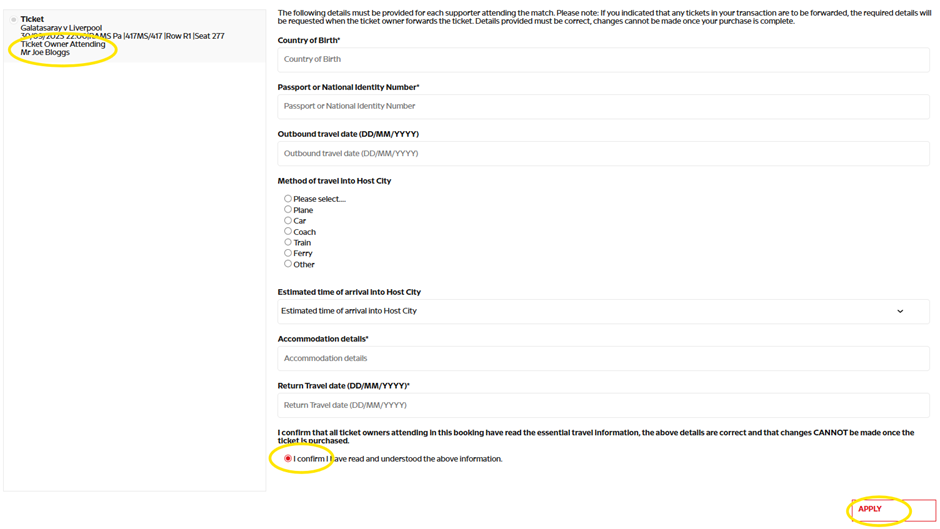
Once travel details for all supporters not forwarding their ticket have been completed:
1.Check the details added are correct against each ticket.
2.Tick the confirmation statement.
3. Select APPLY.
4. Select SUBMIT.
5. Checkout as usual.
Those who have opted to forward their ticket to someone on their Friends & Family list are required to complete the travel form for the person attending when forwarding their ticket.
Ticket Forwarding
Once a booking has been completed, the ticket is typically available to forward within 15 minutes. The ticket owner has until the advertised deadline to forward the ticket to a supporter on their Friend or Family List.
The ticket owner who has chosen to forward their ticket should:
1. Log in to My Account.
2. Click on their initials in the top right corner.
3. Select Tickets.
4. Highlight the ticket.
5. Select FORWARD TICKET.

6. On the pop up screen, select FORWARD TICKET.
a. It is important that supporters choose the correct supporter on their Friends & Family List as they will be unable to make any changes once the ticket has been forwarded

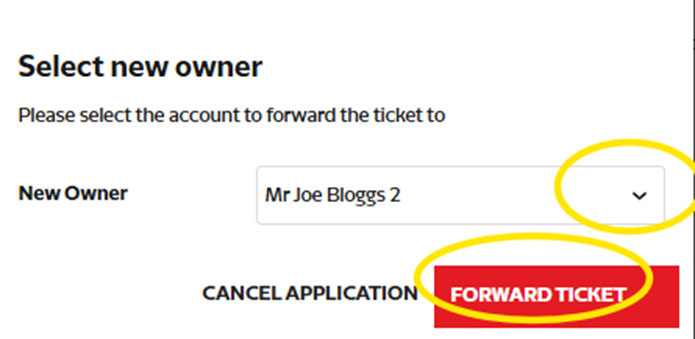
7. From the New Owner drop down, choose the supporter the ticket is to be forwarded to.
8. Select FORWARD TICKET.
Supporters will then be taken to their basket – click Proceed.
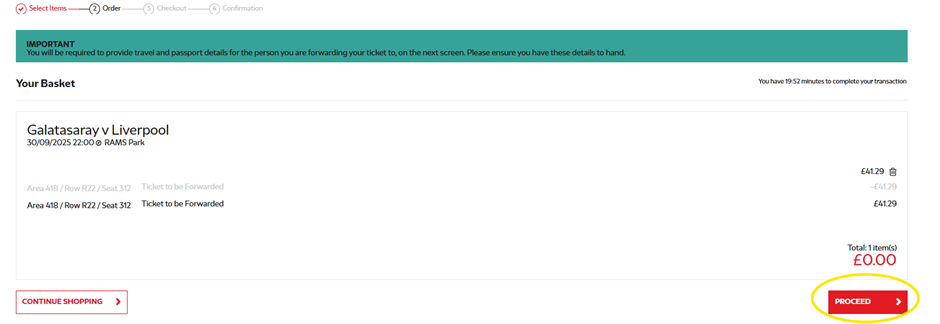
Supporters will then be taken to the travel form.
9. Check the details added are correct.
10. Tick the confirmation statement.
11. Select SUBMIT.
12. Checkout as usual